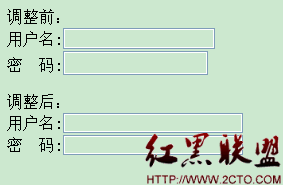
<input > 标签内的 type 分别为 password 和 text 时其默认长度和宽度不一致,而在做登陆框时往往需要将它们的长度和宽度设置一致。如下的方法可以通过 css 控制使其一致:
< html >
< head > </ head >
< body >
调整前:</ br >
用户名:< input type ="text" id ="tex" > </ br >
密 码:< input type ="password" id ="pass" > </ br > </ br >
调整后:</ br >
用户名:< input type ="text" style ="width:180px;height:20px;" id ="tex" > </ br >
密 码:< input type ="password" style ="width:180px;height:20px;" id ="pass" >
</ body >
</ html >
以下为页面截图:

摘自 懒人小何